From 10-minute recording to edited content in 14 seconds
Daniel Duke · 7 min read
Detail, our video production app, is an iPad App of the Year winner and Apple Design Award finalist. From real-time video composition, to free captions, and text-based editing, we built most of the heavy lifting on-device, for the best user experience.
But when we introduced features like Auto Edit to create short clips, or audio enhancement for podcasts, we had to fall back on cloud APIs. And, as Detail's popularity grew, so did our infrastructure bills.
So, we started training the models ourselves. We built Desert Ant Labs while solving these problems and Detail became the first Desert Ant customer – running our models in a real production app with thousands of users touching them every day.
Detail 6, out now for iOS 27, replaces all of our cloud APIs with our own local models, running entirely on the device.
The final piece of that puzzle was replacing the entire Auto Edit pipeline with Desert Ant models and the results speak for themselves: ten minutes of video in, five outputs, 14 seconds, and zero network calls. That's 43x realtime, end-to-end with nothing leaving the device. This post breaks down how we did it.
The pipeline
Before
Detail's Auto Edit feature takes a raw recording and turns it into a single polished video or multiple short clips. To do that, we have to generate a timestamped transcript, clean up the audio, remove filler words, transcribe captions and identify the right parts of the video to turn into shorter snippets.
Previously, this workflow was dependent on a series of third-party models and calls. First of all, it required the user to identify their language with a simple dropdown selection.
The transcript came out of three engines: Apple's SpeechAnalyzer, Apple's older recognizer, and WhisperKit. On top of those sat a vocabulary boost filter and a pile of quality heuristics whose job was picking whichever engine would be most accurate for the user's language and run best on their device.
Audio enhancement was sent to Dolby Media Enhance and back, billed per minute of audio processed. Server-side audio processing without progress reporting and variable processing times, that we had to poll for status, and work around in our interface. Clip selection and titles went to Claude, two more extensive prompts with large context windows, wrapped in hundreds of lines of Swift code in our Auto Editor class.
That's three round trips off the device, expensive API services and variable response times without any progress reports. Auto editing a 10-minute video would take 90-120 seconds, give or take server and network speeds, and it was costing thousands of euros a month, with costs doubling every 60-90 days.
After
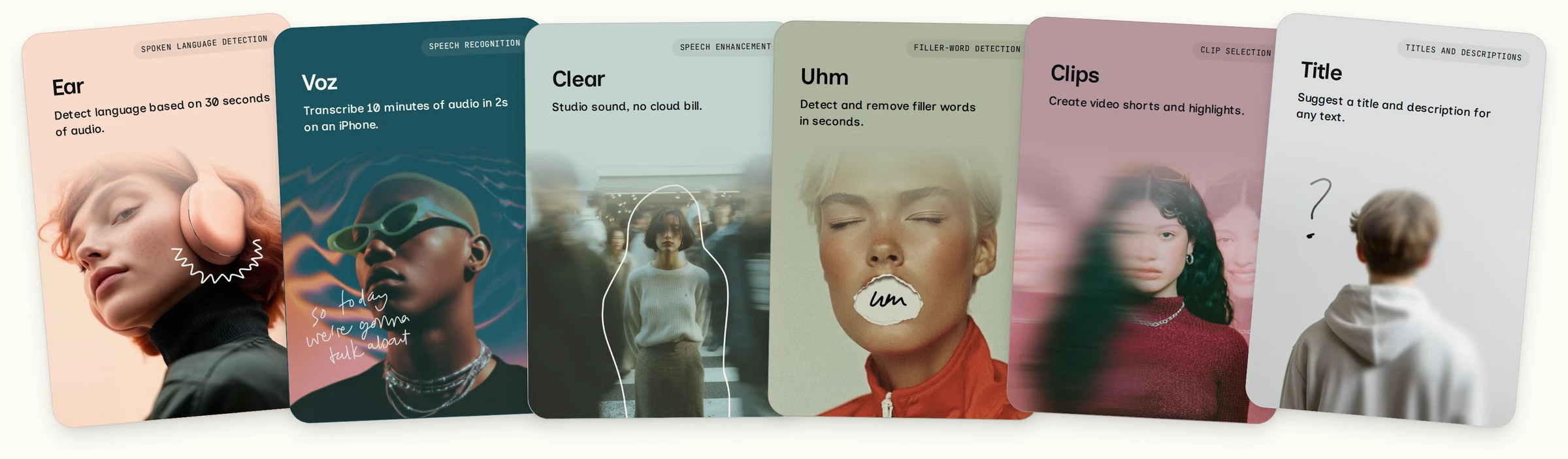
We replaced this pipeline with six specialized Desert Ant models, one per job.
Ear listens to three 30-second windows of the recording and returns a language code in 250ms, across 99 languages. Based on the language Ear detects, we can select the best transcription model for your language.
Voz transcribes ten minutes of narration in two seconds on an iPhone 17 Pro. Voz is an optimized Parakeet model that runs at 300x realtime on the Apple Neural Engine, and supports 25 European languages. The accuracy of start and end times for word-level timestamps is critical when you edit a video or audio file based on a transcript, so we optimized Voz for precision.
Clear takes the raw audio from your microphone and reduces background noise, analyzes and adjusts loudness to the recommended LUFS for podcast recordings, and enhances the sound profile to bring it closer to a studio recording. Running at 300x speed, processing audio faster than a typical upload to Dolby.
Uhm analyzes the audio track of a video and marks every um, uh and hmm to within 20ms. They come back as timestamps rather than text, so the editor cuts them out of the audio without transcribing anything again.
Clips replaces the Claude API call that used to pick the best short clips in a video. The model reads the transcript, scores every sentence for editorial value in one encoder pass, and marks where a clip should start and end. Candidate spans are built around the peaks in scores, identified at 2.8ms each on an iPhone 17 Pro, and a scheduling pass picks the best sets.
Title takes the transcript of the snippets output by Clips and names them. The model runs async after we generate and load the clips for the user, progressively loading titles and descriptions for each clip one by one in about a second.
By moving our auto editing pipeline fully on-device, we reduced 90-120 second response times with no clarity on progress, to around 14 seconds end-to-end. We cut our cloud spend and we're able to rethink how we charge for these features in our app, or how we use results to upsell free users to our pro plans.
The results
This whole pipeline from raw recording to transcript, final edit and clips now takes 14 seconds. That's roughly 43x realtime across the editing pipeline: transcription, audio enhancement, filler detection, clip selection, and titles and descriptions.
The table below shows what each step used to run on, and the model that replaced it.
Auto Edit step
Previous model or solution
Desert Ant model
Language detection
User selected
Ear
Transcription
Three engines: Apple SpeechAnalyzer, Apple's older recognizer, WhisperKit
Voz (Whisper as fallback)
Audio enhancement
Dolby Media Enhance, billed per minute
Clear
Filler word removal
Already on device
Uhm
Clip selection
Claude, cloud
Clips
Title and description generation
Claude, cloud
Title
And this is how long each model took in the Auto Edit workflow, as tested on an iPhone 17 Pro.
Auto Edit on a 10-minute recording, iPhone 17 Pro
Ear
0.25s
Voz
2.05s · 307x realtime
Clear
2.58s · 235x realtime
Uhm
3.90s · 155x realtime
Clips
5.00s · 122x realtime
Title
0.65s
Total 14.18s. Each time includes loading the model (0.02s to 0.21s); realtime is the 10-minute recording divided by run time.
The other benefit was how much work disappeared around the models. Replacing a service removed an API call and polling code, but it could also remove prompts, filters, settings and code that existed to accommodate that service. In Detail, those changes added up across the workflow.
With our local models, we could simplify our code and design a more predictable user experience with clear progress. There is less code to maintain, and Auto Edit no longer depends on remote inference services. Once the models are downloaded, the workflow makes no network call and incurs no per-call cloud inference charge.
0:00
Auto Edit on a 10-minute podcast video with two speakers, in Detail 5.7.1 (left) and Detail 6.0 (right), both on an iPhone 15. The timings above were measured separately on an iPhone 17 Pro.
Shipping in Detail. Ready for your products
This local-only Auto Edit ships in Detail 6 on iOS 27, and with it we have replaced all of our cloud APIs with our local, specialized Desert Ant models – these same models that are available via the Desert Ant SDK today so you can start building with them too.
Ready to get started? You can implement Desert Ant models in your app with our native Swift, Kotlin, and JavaScript SDK, available on GitHub.
Our docs are written for developers and agents and you can try the models on your Mac with the CLI, or in your browser on Hugging Face.
Want to build your own version of Auto Edit? Our Clipper demo app can help you get started. It uses Voz for transcription, Clips for snippet ranking and Title to name the clips. Clipper runs as a Mac app and a command line tool, and the source code is available on GitHub.
Clipper
Built with Voz, Clips, Title
Generate short clips from a video podcast or a long recording, fully on device. A macOS app and a command-line tool over the same core.
Voz transcribes with a time on every word, Clips ranks the best spans, and Title writes a title and description for each.
macOS 26 or later, Apple Silicon
Install with Homebrew
brew tap desert-ant-labs/tapbrew install --cask clipper